¶ Installation et utilisation de la registry Harbor
¶ Références
¶ Articles associés
¶ Environement d'installation
OS: Debian GNU/Linux 13 (trixie)
Serveur type KVM
RAM 2Go
Vcpu 2
Disque: 3OGo ( a augmenter en fonction de la volumetrie d'image a stocker)
FQDN: harbor.bv.stef.lan
L'application est deployé avec Docker,l'OS importe donc peu.
¶ Principe de fonctionnement
Les builds d'images sont fait via une automation (workflow) sur mon Gitea interne (gitea.bv.stef.lan) qui sert à héberger le code ( git)
- Apres git commit, le code est push sur Gitea.
- Le Push déclanche un workflow de build ( voir la section Remarque sur le CI/CD Gitea plus bas ).
- Le workflow essai de builder le container applicatif.
- Si ok, l'images est push la registry Harbor.
- Harbor analyse le contenu le l'image reçue.
- L'utilisateur déploi une application nécessitant l'image stockée sur Harbor.
- Si l'image démandé respecte les conditions définies dans le projet Harbor l'hebergeant, elle est envoyé.
¶ Installation
¶ Prérequis
Docker ( installer sur mon instance via ansible )
stef@harbor:~$ docker --version
Docker version 29.1.2, build 890dcca
¶ Préparation des certificats SSL
J'ai généré un certificat pour harbor signé par ma CA interne
Certificat de type server avec ajout des SANs:
DNS: harbor.bv.stef.lan, DNS:harbor, DNS:bv.stef.lan
Ceci n'est nécessaire dans le cadre d'une connection direct à Harbor.
Nous verrons plus loin comment y acceder via le RP Traefik.Dans ce mode les certificats ne sont plus nécessaires ( le TLS etant géré par Traefik)
Certificate:
    Data:
        Version: 3 (0x2)
        Serial Number: 7715856718254110920 (0x6b143ace0d58f8c8)
        Signature Algorithm: sha256WithRSAEncryption
        Issuer: CN=zen-ca, C=FR, ST=Ile de France, L=MALAKOFF, O=Zen6, OU=Lab
        Validity
            Not Before: Dec 11 19:13:44 2025 GMT
            Not After : Dec  9 19:13:44 2035 GMT
        Subject: CN=harbor.bv.stef.lan, C=FR, ST=Ile de France, L=Bures sur Yvette, O=Zen6, OU=Lab
...
...
        X509v3 extensions:
            X509v3 Basic Constraints:
                CA:FALSE
            Netscape Cert Type:
                SSL Server
            X509v3 Key Usage:
                Digital Signature, Key Encipherment
            Netscape Comment:
                OpenSSL Generated Server Certificate
            X509v3 Subject Key Identifier:
                51:75:46:6E:3C:EE:7B:F9:30:EB:05:36:9F:39:98:74:2B:B0:62:E8
            X509v3 Authority Key Identifier:
                keyid:A9:D9:98:60:CF:38:5F:74:69:BC:77:7A:70:BD:D8:CE:D5:96:D7:67
                DirName:/CN=zen-ca/C=FR/ST=Ile de France/L=MALAKOFF/O=Zen6/OU=Lab
                serial:4C:5E:74:10:DB:5E:BE:1B
            X509v3 Extended Key Usage:
                TLS Web Server Authentication, TLS Web Client Authentication, 1.3.6.1.5.5.8.2.2
            X509v3 Subject Alternative Name:
                DNS:harbor.bv.stef.lan, DNS:harbor, DNS:bv.stef.lan
    Signature Algorithm: sha256WithRSAEncryption
Ajout des certifcats dans l'environement docker :
/etc/docker/certs.d/
└── harbor.bv.stef.lan
    ├── ca.crt   									<= Certificat de CA
    ├── harbor.bv.stef.lan.crt		<= Certificat Harbor
    └── harbor.bv.stef.lan.key    <= Clé privée du certificat Harbor
Ajouter égalemnent le CA au niveau OS
mkdir /usr/local/share/ca-certificates/my-ca/
cp ca.crt /usr/local/share/ca-certificates/my-ca/zen6ca.crt
Puis lancer:
update-ca-certificates
¶ Récupération de la clé de signature Harbor
root@harbor:~# gpg --keyserver hkps://keyserver.ubuntu.com --receive-keys 644FF454C0B4115C
gpg: répertoire « /root/.gnupg » créé
gpg: le trousseau local « /root/.gnupg/pubring.kbx » a été créé
gpg: /root/.gnupg/trustdb.gpg : base de confiance créée
gpg: clef 644FF454C0B4115C : clef publique « Harbor-sign (The key for signing Harbor build) <jiangd@vmware.com> » importée
gpg:       Quantité totale traitée : 1
gpg:                     importées : 1
¶ Installation harbor
¶ Récuperer l'installer Harbor
Consulter https://github.com/goharbor/harbor/releases pour récupérer l'url de l'archive à jour.
mkdir -p /home/stef/dockers ; cd  /home/stef/dockers
wget https://github.com/goharbor/harbor/releases/download/v2.14.1/harbor-online-installer-v2.14.1.tgz
¶ Décompression de l'installer
stef@harbor:~# tar xvzf harbor-online-installer-v2.14.1.tgz
harbor/prepare
harbor/LICENSE
harbor/install.sh
harbor/common.sh
harbor/harbor.yml.tmpl
¶ Préparation de la configuration
Copier le fichier du template de confguration
cd harbor
cp harbor.yml.tmpl harbor.yml
Editer le fichier harbor.yml
Dans mon cas j'ai juste modifié:
- hostname: harbor.bv.stef.lan
- certificate: /etc/docker/certs.d/harbor.bv.stef.lan/harbor.bv.stef.lan.crt
- private_key: /etc/docker/certs.d/harbor.bv.stef.lan/harbor.bv.stef.lan.key
- ca_file: /etc/ssl/certs/zen6ca.pem
Le diff
stef@harbor:~/dockers/harbor$ diff harbor.yml harbor.yml.tmpl
5c5
< hostname: harbor.bv.stef.lan
---
> hostname: reg.mydomain.com
17,18c17,18
<   certificate: /etc/docker/certs.d/harbor.bv.stef.lan/harbor.bv.stef.lan.crt
<   private_key: /etc/docker/certs.d/harbor.bv.stef.lan/harbor.bv.stef.lan.key
---
>   certificate: /your/certificate/path
>   private_key: /your/private/key/path
114c114
<   security_check: vuln,config,secret
---
>   security_check: vuln
237,238c237,238
< uaa:
<    ca_file: /etc/ssl/certs/zen6ca.pem
---
> # uaa:
> #   ca_file: /path/to/ca
¶ Lancer le script prepare:
stef@harbor:~/dockers/harbor$ ./prepare
prepare base dir is set to /home/stef/dockers/harbor
Generated configuration file: /config/portal/nginx.conf
Generated configuration file: /config/log/logrotate.conf
Generated configuration file: /config/log/rsyslog_docker.conf
Generated configuration file: /config/nginx/nginx.conf
Generated configuration file: /config/core/env
Generated configuration file: /config/core/app.conf
Generated configuration file: /config/registry/config.yml
Generated configuration file: /config/registryctl/env
Generated configuration file: /config/registryctl/config.yml
Generated configuration file: /config/db/env
Generated configuration file: /config/jobservice/env
Generated configuration file: /config/jobservice/config.yml
copy /data/secret/tls/harbor_internal_ca.crt to shared trust ca dir as name harbor_internal_ca.crt ...
ca file /hostfs/data/secret/tls/harbor_internal_ca.crt is not exist
copy  to shared trust ca dir as name storage_ca_bundle.crt ...
copy None to shared trust ca dir as name redis_tls_ca.crt ...
loaded secret from file: /data/secret/keys/secretkey
Generated configuration file: /compose_location/docker-compose.yml
Clean up the input dir
¶ Lancer l'installation ( en root )
stef@harbor:~/dockers/harbor$ sudo ./install.sh --with-trivy
[Step 0]: checking if docker is installed ...

Note: docker version: 29.1.2

[Step 1]: checking docker-compose is installed ...

Note: Docker Compose version v5.0.0


[Step 2]: preparing environment ...

[Step 3]: preparing harbor configs ...
prepare base dir is set to /home/stef/dockers/harbor
Clearing the configuration file: /config/jobservice/config.yml
Clearing the configuration file: /config/jobservice/env
Clearing the configuration file: /config/trivy-adapter/env
Clearing the configuration file: /config/core/app.conf
Clearing the configuration file: /config/core/env
Clearing the configuration file: /config/portal/nginx.conf
Clearing the configuration file: /config/nginx/nginx.conf
Clearing the configuration file: /config/registryctl/config.yml
Clearing the configuration file: /config/registryctl/env
Clearing the configuration file: /config/log/logrotate.conf
Clearing the configuration file: /config/log/rsyslog_docker.conf
Clearing the configuration file: /config/registry/config.yml
Clearing the configuration file: /config/registry/passwd
Clearing the configuration file: /config/db/env
Generated configuration file: /config/portal/nginx.conf
Generated configuration file: /config/log/logrotate.conf
Generated configuration file: /config/log/rsyslog_docker.conf
Generated configuration file: /config/nginx/nginx.conf
Generated configuration file: /config/core/env
Generated configuration file: /config/core/app.conf
Generated configuration file: /config/registry/config.yml
Generated configuration file: /config/registryctl/env
Generated configuration file: /config/registryctl/config.yml
Generated configuration file: /config/db/env
Generated configuration file: /config/jobservice/env
Generated configuration file: /config/jobservice/config.yml
copy /data/secret/tls/harbor_internal_ca.crt to shared trust ca dir as name harbor_internal_ca.crt ...
ca file /hostfs/data/secret/tls/harbor_internal_ca.crt is not exist
copy  to shared trust ca dir as name storage_ca_bundle.crt ...
copy None to shared trust ca dir as name redis_tls_ca.crt ...
loaded secret from file: /data/secret/keys/secretkey
Generated configuration file: /config/trivy-adapter/env
Generated configuration file: /compose_location/docker-compose.yml
Clean up the input dir


Note: stopping existing Harbor instance ...


[Step 4]: starting Harbor ...
[+] up 11/11
 ✔ Network harbor_harbor       Created                                                                                                                                                        0.0s
 ✔ Container harbor-log        Created                                                                                                                                                        0.1s
 ✔ Container redis             Created                                                                                                                                                        0.2s
 ✔ Container harbor-portal     Created                                                                                                                                                        0.2s
 ✔ Container registry          Created                                                                                                                                                        0.2s
 ✔ Container registryctl       Created                                                                                                                                                        0.2s
 ✔ Container harbor-db         Created                                                                                                                                                        0.1s
 ✔ Container trivy-adapter     Created                                                                                                                                                        0.1s
 ✔ Container harbor-core       Created                                                                                                                                                        0.1s
 ✔ Container harbor-jobservice Created                                                                                                                                                        0.1s
 ✔ Container nginx             Created                                                                                                                                                        0.1s
✔ ----Harbor has been installed and started successfully.----
¶ Vérification Docker:
stef@harbor:~/dockers/harbor$ docker compose ps
NAME                IMAGE                                   COMMAND                  SERVICE         CREATED              STATUS                        PORTS
harbor-core         goharbor/harbor-core:v2.14.1            "/harbor/entrypoint.…"   core            About a minute ago   Up About a minute (healthy)
harbor-db           goharbor/harbor-db:v2.14.1              "/docker-entrypoint.…"   postgresql      About a minute ago   Up About a minute (healthy)
harbor-jobservice   goharbor/harbor-jobservice:v2.14.1      "/harbor/entrypoint.…"   jobservice      About a minute ago   Up About a minute (healthy)
harbor-log          goharbor/harbor-log:v2.14.1             "/bin/sh -c /usr/loc…"   log             About a minute ago   Up About a minute (healthy)   127.0.0.1:1514->10514/tcp
harbor-portal       goharbor/harbor-portal:v2.14.1          "nginx -g 'daemon of…"   portal          About a minute ago   Up About a minute (healthy)
nginx               goharbor/nginx-photon:v2.14.1           "nginx -g 'daemon of…"   proxy           About a minute ago   Up About a minute (healthy)   0.0.0.0:80->8080/tcp, [::]:80->8080/tcp, 0.0.0.0:443->8443/tcp, [::]:443->8443/tcp
redis               goharbor/redis-photon:v2.14.1           "redis-server /etc/r…"   redis           About a minute ago   Up About a minute (healthy)
registry            goharbor/registry-photon:v2.14.1        "/home/harbor/entryp…"   registry        About a minute ago   Up About a minute (healthy)
registryctl         goharbor/harbor-registryctl:v2.14.1     "/home/harbor/start.…"   registryctl     About a minute ago   Up About a minute (healthy)
trivy-adapter       goharbor/trivy-adapter-photon:v2.14.1   "/home/scanner/entry…"   trivy-adapter   About a minute ago   Up About a minute (healthy)
¶ Utilisation Harbor
¶ Acces à l'interface
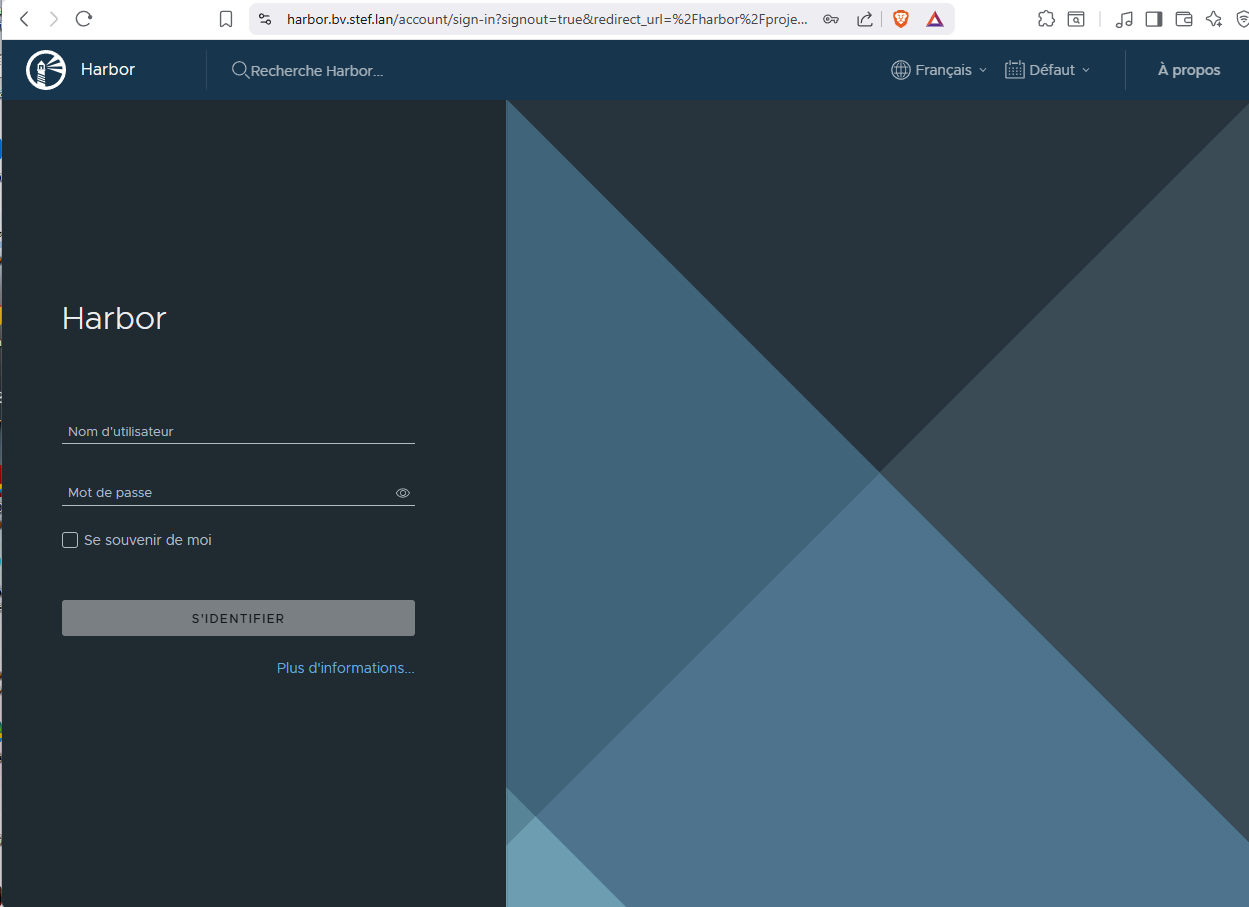
Le mode de passe initial de l'utilsateur admin est definie dans le fichier harbor.yml
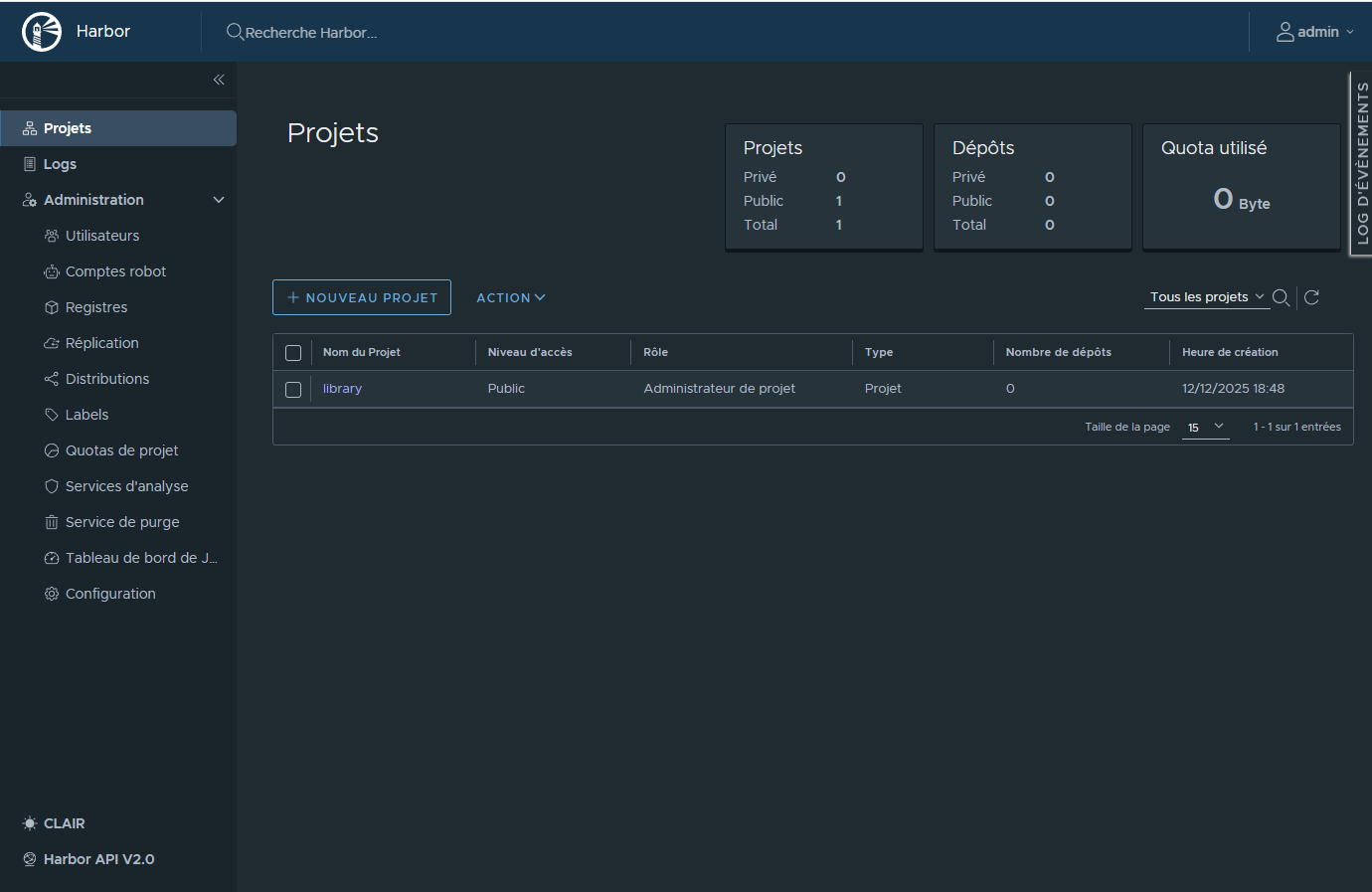
¶ Projet par defaut: library
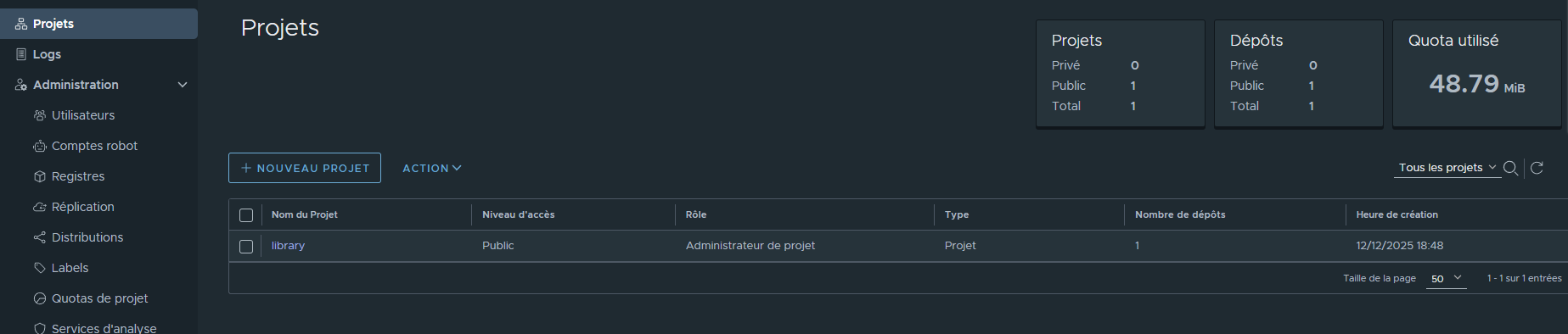
Les projets permettent de séparer des espace de regitry pouvant avoir des configuration et politique spécifique (acces utilsateurs , securisation des images etc ...)
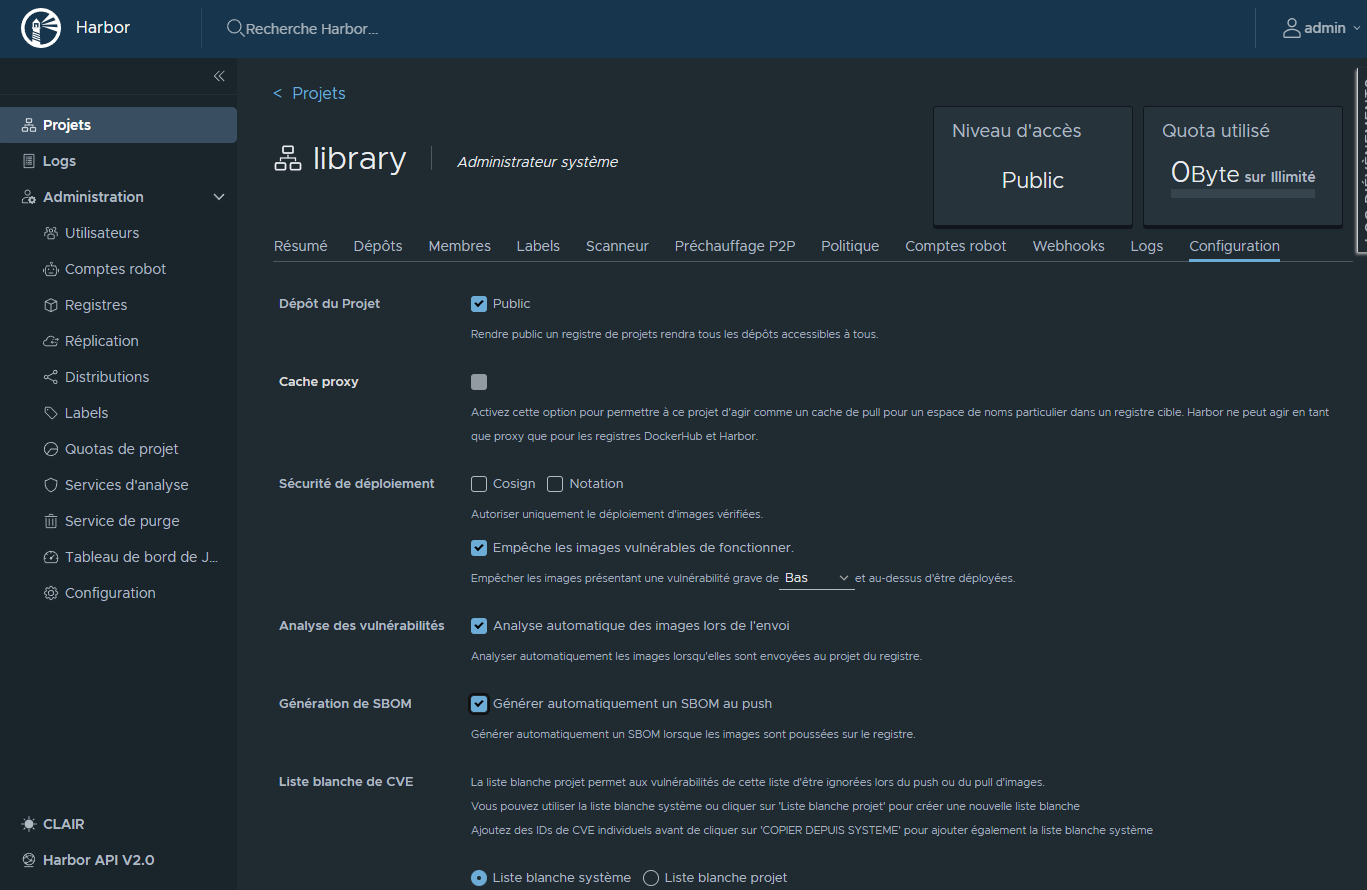
¶ Configuration du projet
Activation:
- Empêcher les images présentant une vulnérabilité minimum Bas à être pull.
- Analyse automatique des images lors de l'envoi.
- Générer automatiquement un SBOM au push.
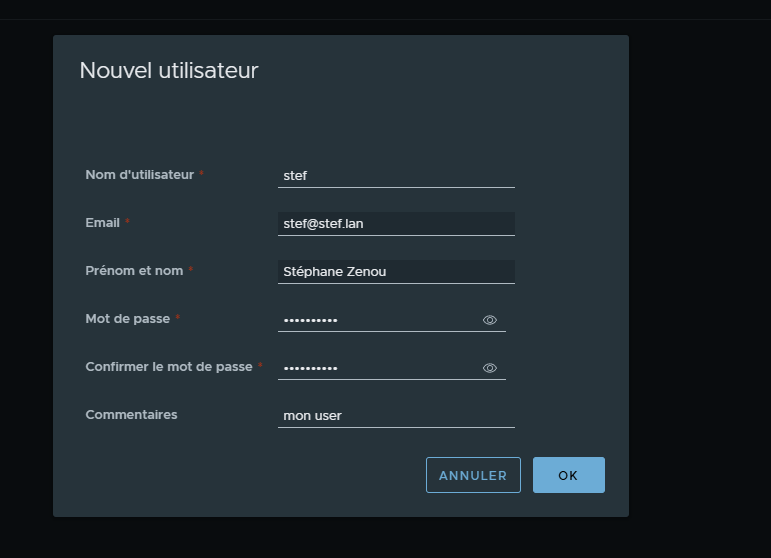
¶ Création d'un utilisateur
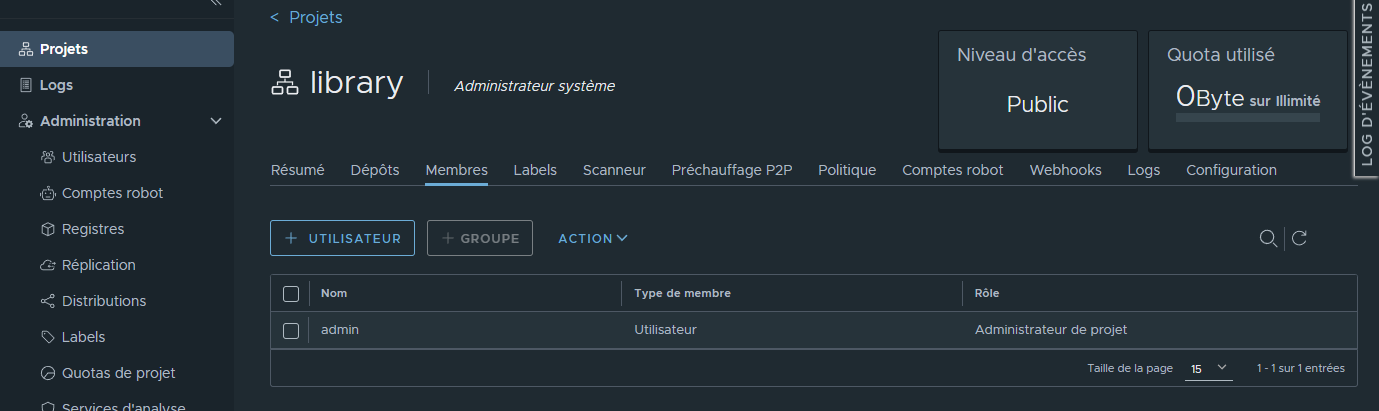
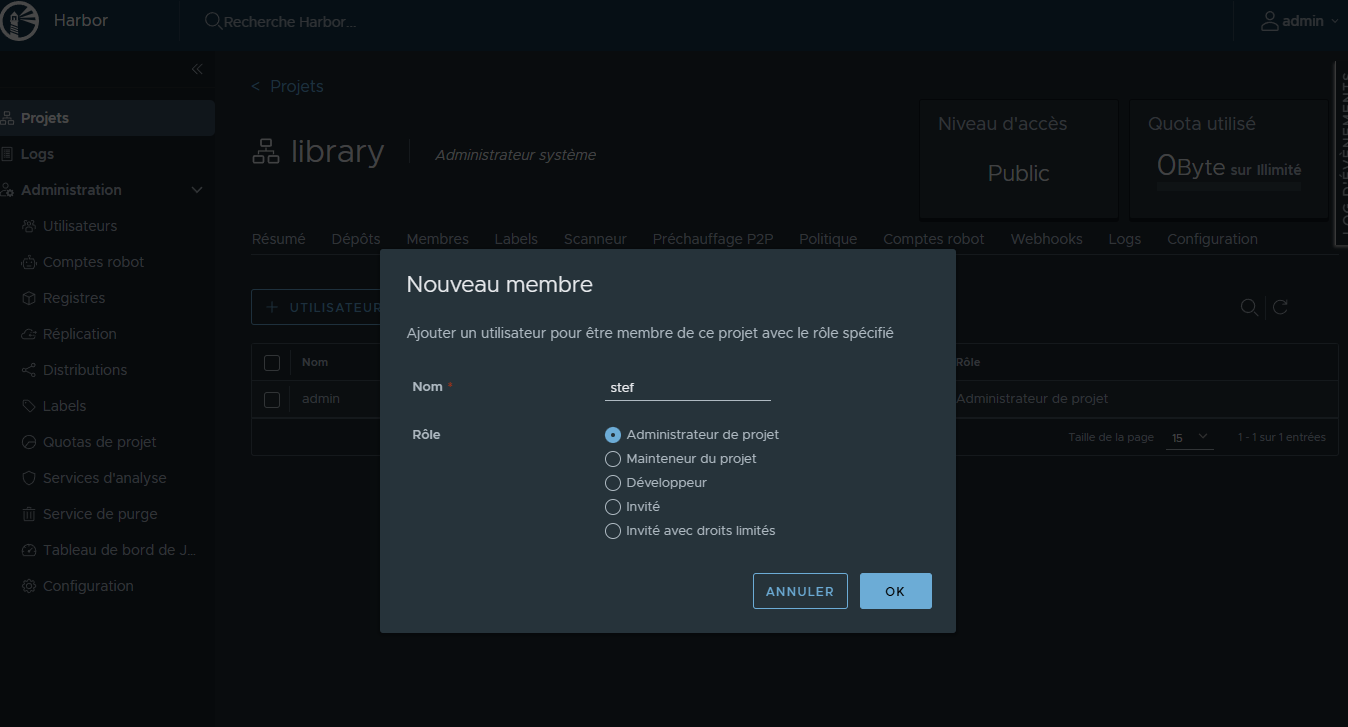
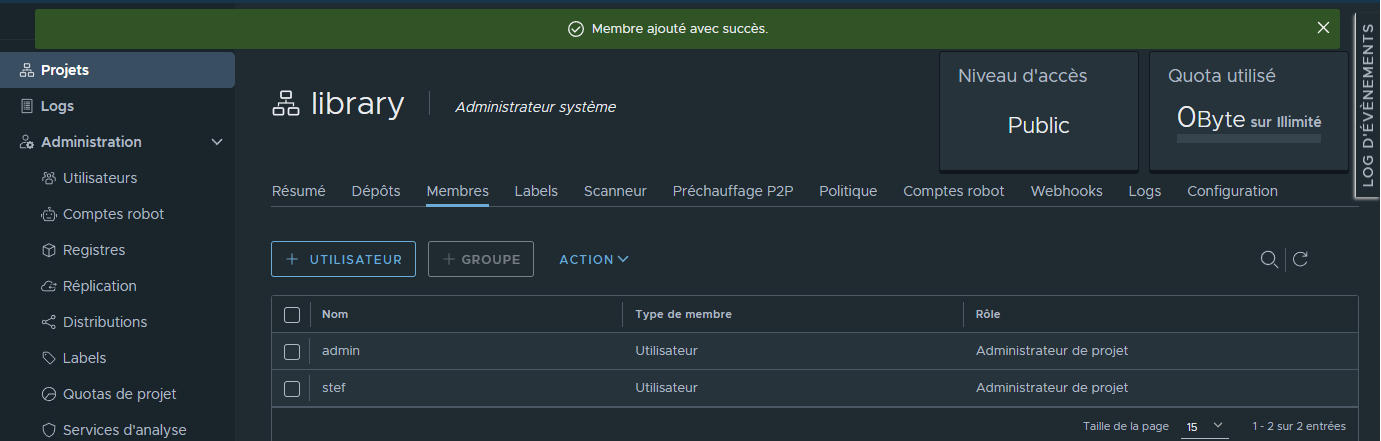
¶ Ajout de l'acces de l'utilsateur au projet
¶ Remarque sur le CI/CD Gitea
Le worflow Gitea est prévu pour lancer une construction d'image en cas de mise a jour du code (push).
Le fichier de configuration du workflow est inclus dans le code dans : .gitea/workflows/build.yml.
Note: les actions sont elles-meme excuter pas des containers dynamiquement créé et detruits
A chaque push , Gitea lance des jobs ce jobs:
Le job:
1 Récupere la version du code updaté
2 Se connecte aux registry
3 Build l'image et la push vers la registry Harbor.
name: Build
on: [push]

jobs:
  build-and-push-image:
    runs-on: ubuntu-latest
    steps:
      - name: Checkout
        uses: actions/checkout@v4
        with:
          fetch-depth: 0 # Important pour récupérer tout l'historique Git

      - name: Log in to registry
        uses: docker/login-action@v3
        with:
          registry: harbor.bv.stef.lan
          username: ${{ secrets.HARBOR_USERNAME }}
          password: ${{ secrets.HARBOR_PASSWORD }}

      - name: Debug Gitea variables
        run: |
          echo "GITEA_REF: ${GITEA_REF}"
          echo "GITEA_SHA: ${GITEA_SHA}"
          echo "All env variables:"
          env

      - name: Build and push image
        uses: docker/build-push-action@v6
        with:
          context: . # UTILISE LE CONTEXTE LOCAL, PAS L'URL GIT
          push: ${{ github.event_name != 'pull_request' }}
          tags: |
            harbor.bv.stef.lan/library/pki-manager:${{env.GITHUB_SHA}}
          cache-from: type=gha
          cache-to: type=gha,mode=max
          provenance: false # Peut simplifier le débogage initialement
          build-args: |
            BUILDKIT_CONTEXT_KEEP_GIT_DIR=1
Commit & push du code
stef@infra:~/docker/demo-harbor$ git commit -am 'First commit'
[main 33a5023] First commit
 1 file changed, 0 insertions(+), 0 deletions(-)
 create mode 100644 certs/.gitkeep
...
...
To https://gitea.bv.stef.lan/stef/demo-harbor.git
   0660ac8..33a5023  main -> main
la branche 'main' est paramétrée pour suivre 'origin/main'.
Note: je n'avais pas validé la vérification de sécurité à ce stade
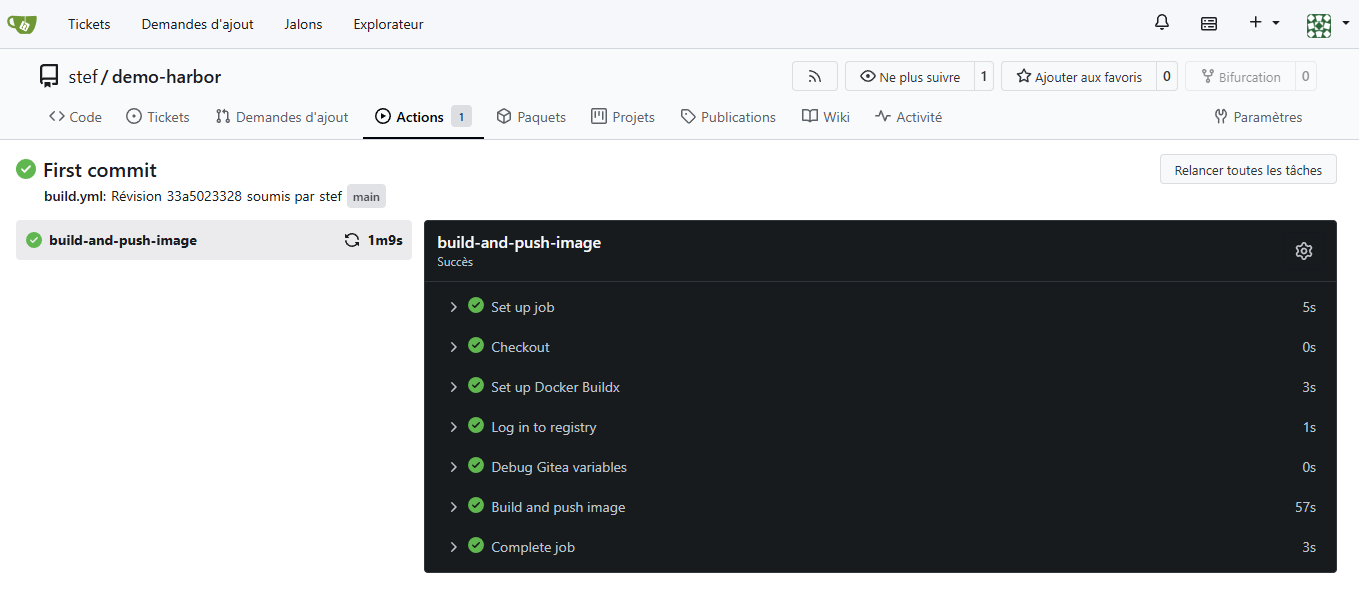
¶ Vérification du job de build dans Gitea:
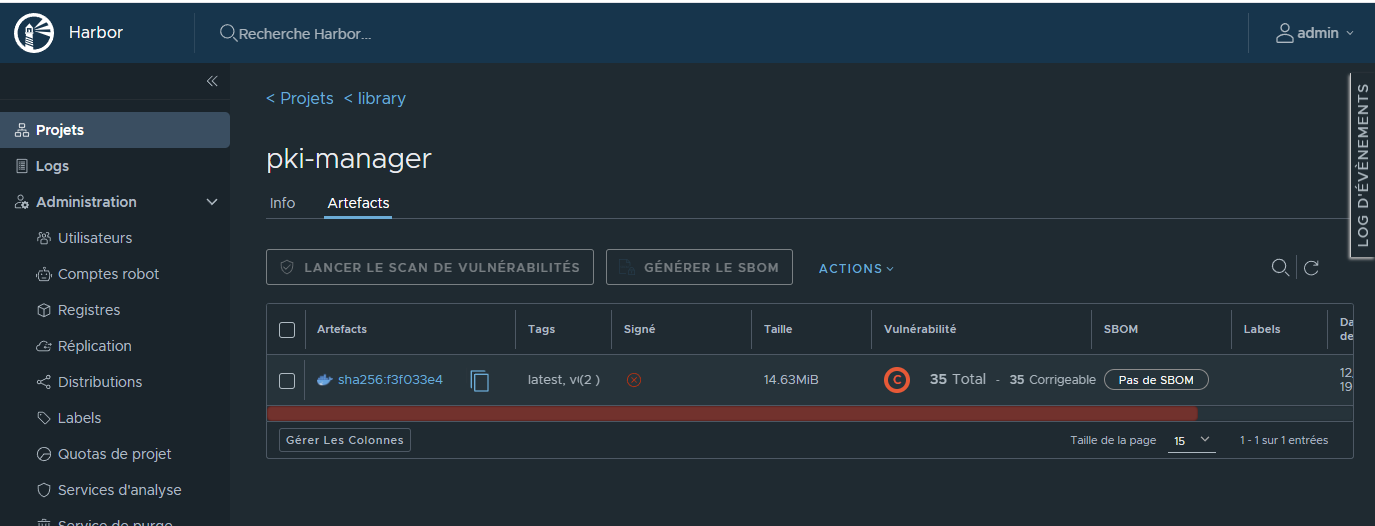
¶ Vue du push dans Harbor
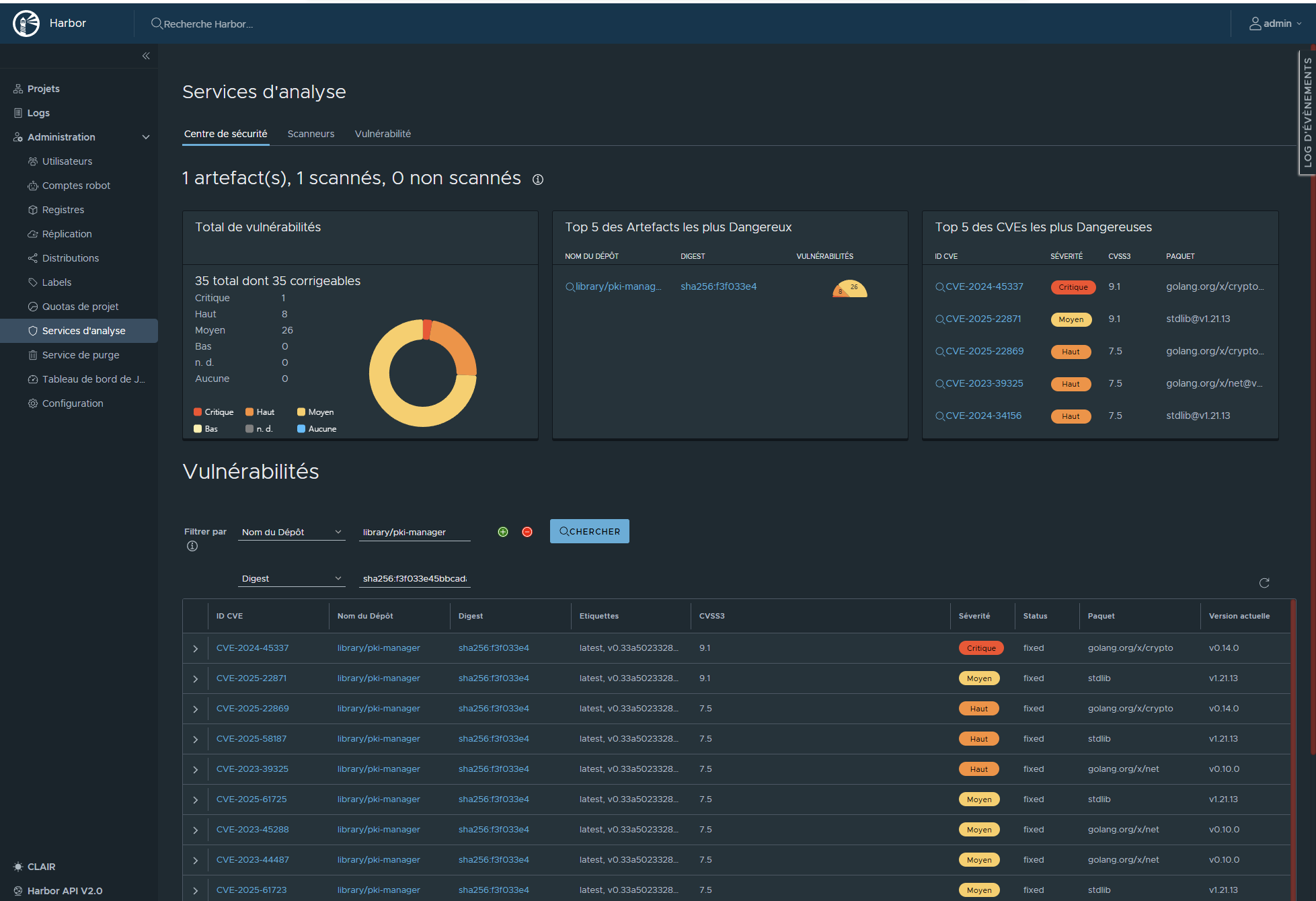
¶ Vue du Service d'analyse (Securité)
¶ Essai de récupération de l'image
stef@infra:~/docker/demo-harbor$ docker pull harbor.bv.stef.lan/library/pki-manager@sha256:f3f033e45bbcadac70b197d618708c6771050f45fdb08b6c1e016dee6803ff47
Error response from daemon: unknown: failed to resolve reference "harbor.bv.stef.lan/library/pki-manager@sha256:f3f033e45bbcadac70b197d618708c6771050f45fdb08b6c1e016dee6803ff47": unexpected status from HEAD request to https://harbor.bv.stef.lan/v2/library/pki-manager/manifests/sha256:f3f033e45bbcadac70b197d618708c6771050f45fdb08b6c1e016dee6803ff47: 412 Precondition Failed
Le repo (projet) a été configuré pour ne pas délivrer d'images ayant un probleme de sécurité ce qui est le cas dans l'exemple.
¶ Corrections
On note deux type de problèmes
- Le plugin Trivy inclus dans Harbor détecte 35 problèmes de sécurités.
- La stdlib est lié la version d'image utlisée pour build qui est obsolète ( golang:1.21-alpine )
- Les autres problemes sont liés aux versions de modules Go (library) utilisés dans le code.
Trivy nous indique égalemnebt que totu les problèmes dispose d'un correctif.
¶ Modification de l'image de build dans le Dockerfile
Ancien Dockerfile
FROM golang:1.21-alpine AS builder <= Le probleme stdlib est lié l'utilisation de l'image golang:1.21-alpine

WORKDIR /app

COPY go.mod go.sum ./
RUN go mod download

COPY . .
RUN CGO_ENABLED=0 GOOS=linux go build -a -installsuffix cgo -o main ./cmd/server

FROM alpine:latest
RUN apk --no-cache add ca-certificates

WORKDIR /app
COPY --from=builder /app/main .
COPY --from=builder /app/internal/web ./internal/web
COPY --from=builder /app/certs ./certs

EXPOSE 8080

CMD ["./main"]
Modification du Dockerfile
FROM golang:latest AS builder

WORKDIR /app
...
...
EXPOSE 8080
CMD ["./main"]
Git commit + Push
stef@infra:~/docker/demo-harbor$ git commit -am 'Mise a jour de image de build dans Dockerfile'
[main e62898e] Mise a jour de image de build dans Dockerfile
 1 file changed, 2 insertions(+), 3 deletions(-)
...
...
stef@infra:~/docker/demo-harbor$ git push
...
...
Résultat du build automatisé:
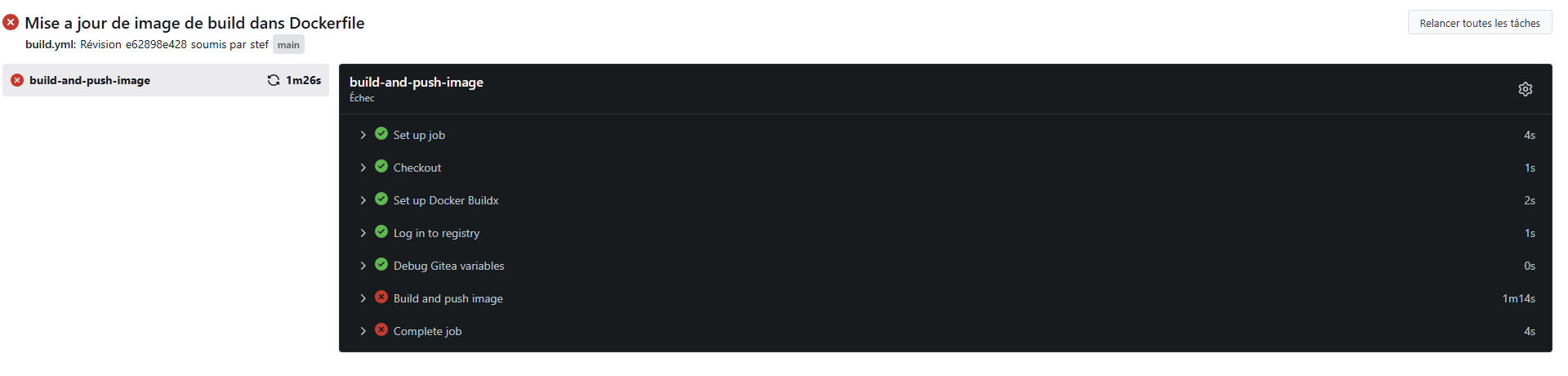
Le build est encore indiqué en erreur
Harbor a tout de même enregistré la nouvelle version de l'image et a procédé au check de sécurité.
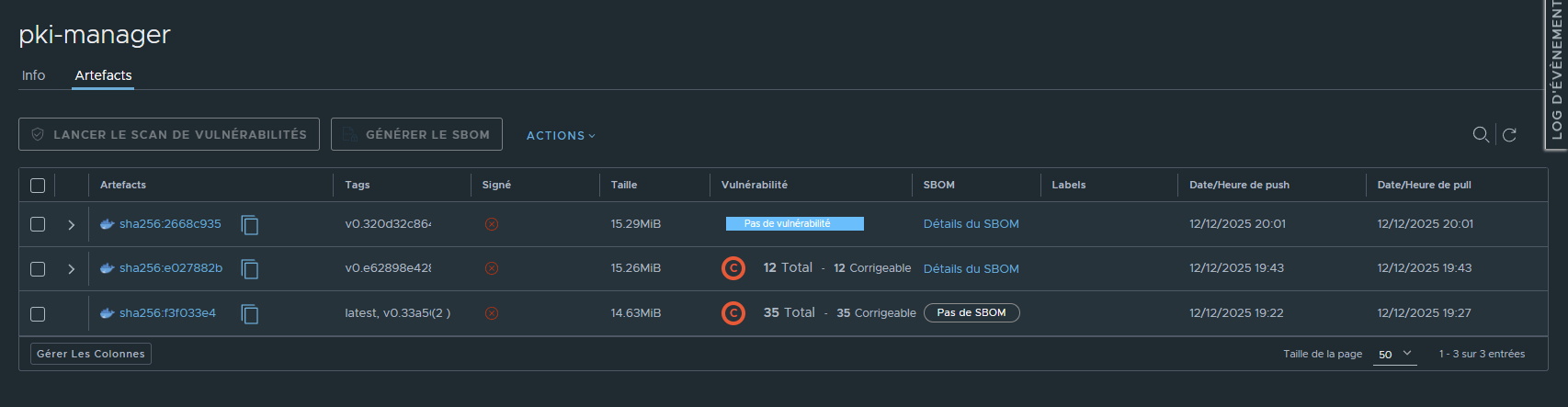
Il ne reste que 12 problèmes sur les 35 précédement détectés:

Les problemes restant sont bien liés à des modules Go, tous ont un correctif et les versions corrigant le CVE remonnté est indiquées.
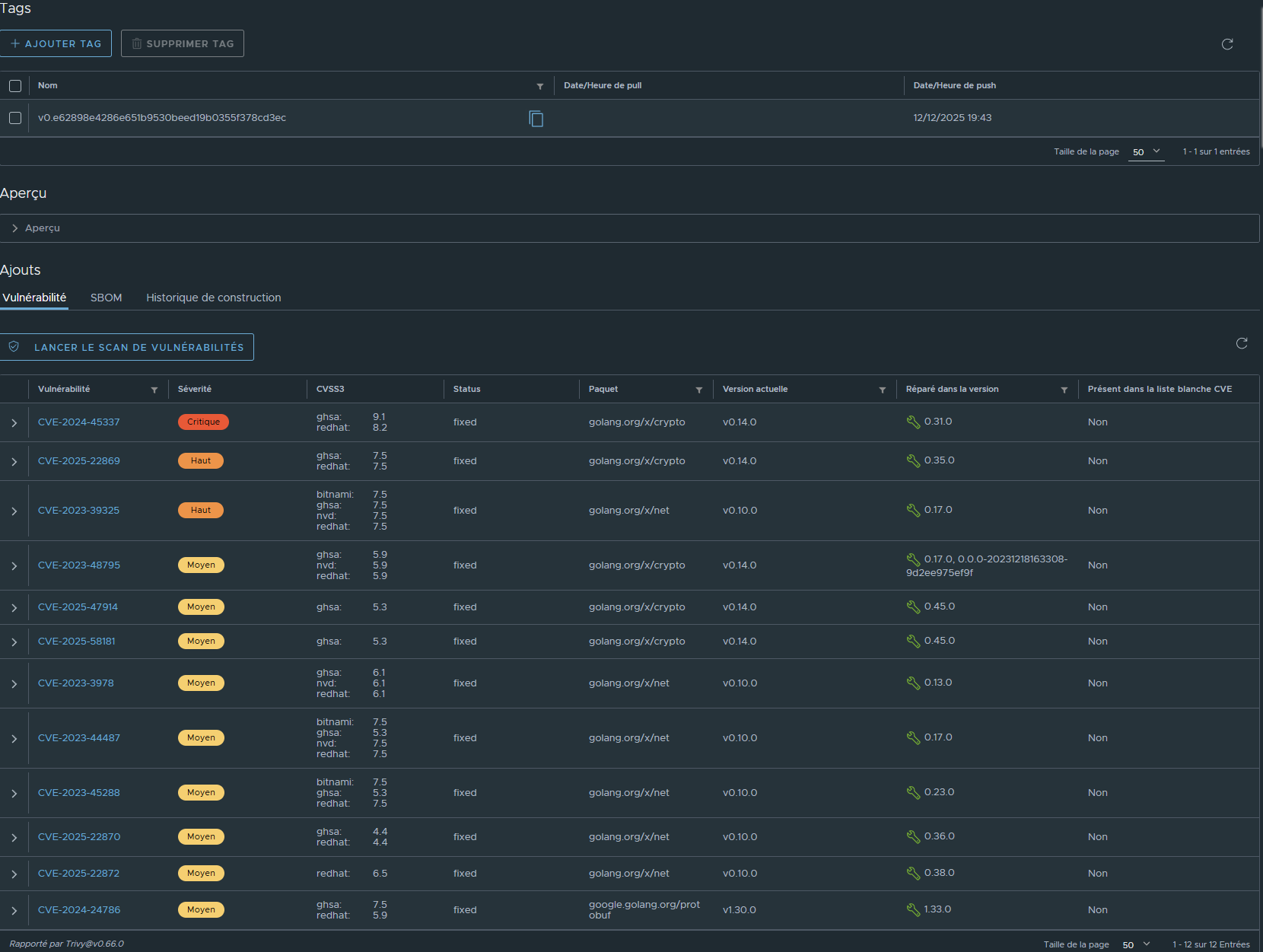
En synthèse, il ne reste dans le code que 3 modules Go devant être mis à jour.
On modifie le code en spécifiant les versions indiquées les plus récentes, à savoir:
- golang.org/x/crypto en v0.45.0
- golang.org/x/net en v0.38.0
- google.golang.org/protobuf en v1.33.0
Modification des fichiers go.mod et go.sum du code, suivie de git commit + push
stef@infra:~/docker/demo-harbor$ git commit -am 'Mise a jour des modules Go'
[main 08dcd6f] Mise a jour des modules Go
 2 files changed, 23 insertions(+), 21 deletions(-)
stef@infra:~/docker/demo-harbor$ git push
..
..
To https://gitea.bv.stef.lan/stef/demo-harbor.git
   e62898e..08dcd6f  main -> main
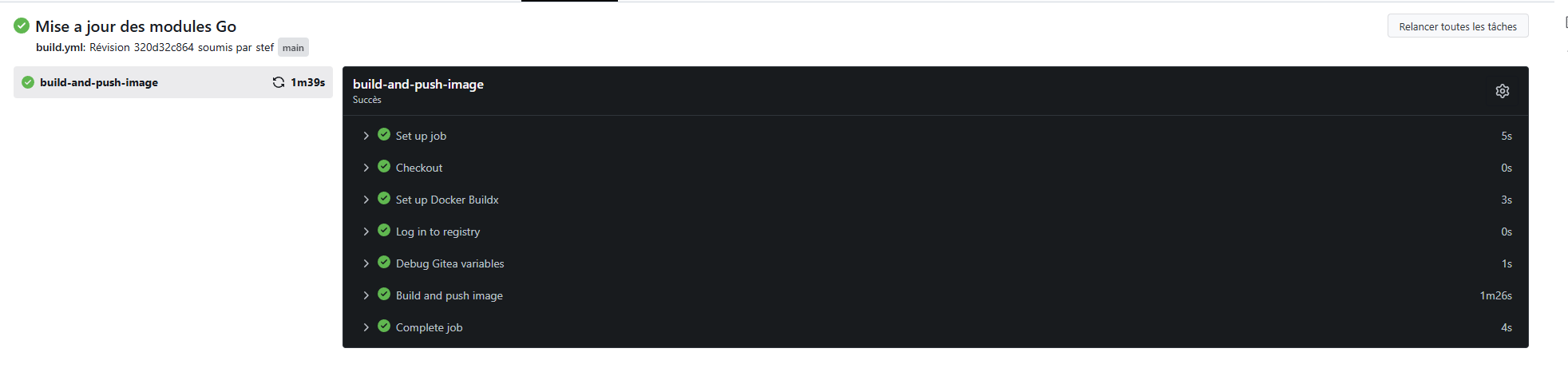
Cette fois-ci pas de d'erreurs remontées au build
Harbor (trivy) ne détecte plus de problèmes de securitées
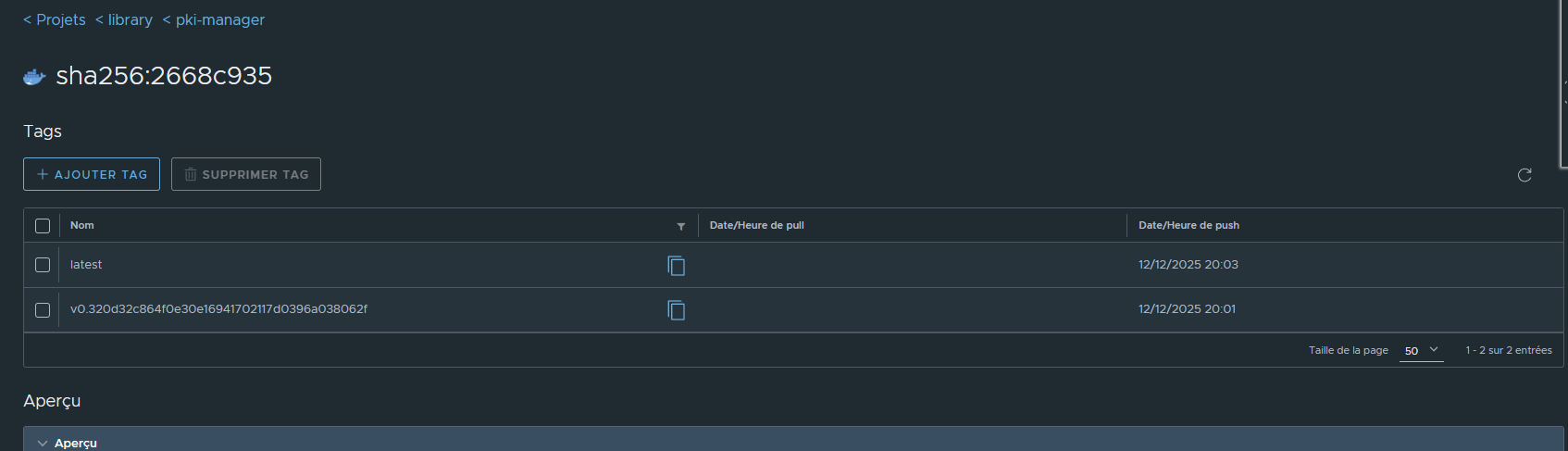
¶ Ajout du tag latest sur la version sans problème de sécurité
¶ Essai de pull de l'image corrigées:
stef@infra:~$ docker pull harbor.bv.stef.lan/library/pki-manager:latest
latest: Pulling from library/pki-manager
f50edf84cc41: Pull complete
89c031999488: Pull complete
934e1a7cecc0: Pull complete
Digest: sha256:2668c935f93d67a4e2da768f3eae2e2802a08768c96eed40abc34f977a7ab9e0
Status: Downloaded newer image for harbor.bv.stef.lan/library/pki-manager:latest
harbor.bv.stef.lan/library/pki-manager:latest
Cette fois-ci l'image Docker est bien récupérable.
On peut déployer l'application via le docker compose , ce dernier se référant au repository Harbor
services:
  mongodb:
    image: mongo:latest
...
...
  pki-api:
    image: harbor.bv.stef.lan/library/pki-manager:latest
    container_name: pki-api
...
...
stef@infra:~/docker/demo-harbor$ docker compose up -d
[+] Running 2/2
 ✔ Container pki-mongodb  Started                         0.1s
 ✔ Container pki-api      Started                         0.2s
stef@infra:~/docker/demo-harbor$
L'application tourne !
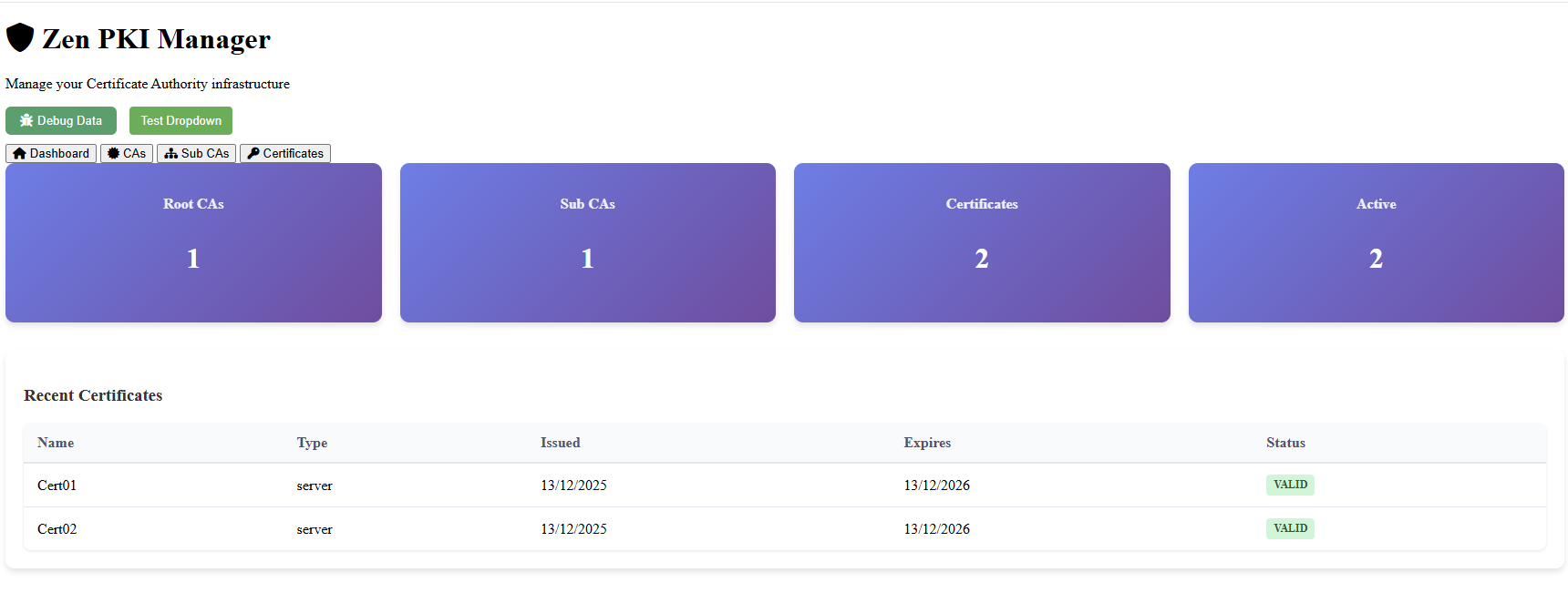
Trivy m'a permis de rapidement corriger le code.
¶ Configuration d'un cache github
Nous allons créer un repo de type cache qui relais des requètes vers gitub.
Ceci permet d'éviter que les serveurs se connectent directement au net.
¶ Configurer un endpoint

¶ Créér un nouveau projet
Activer Cache Proxy puis séléctionner le endpoint précedement creer
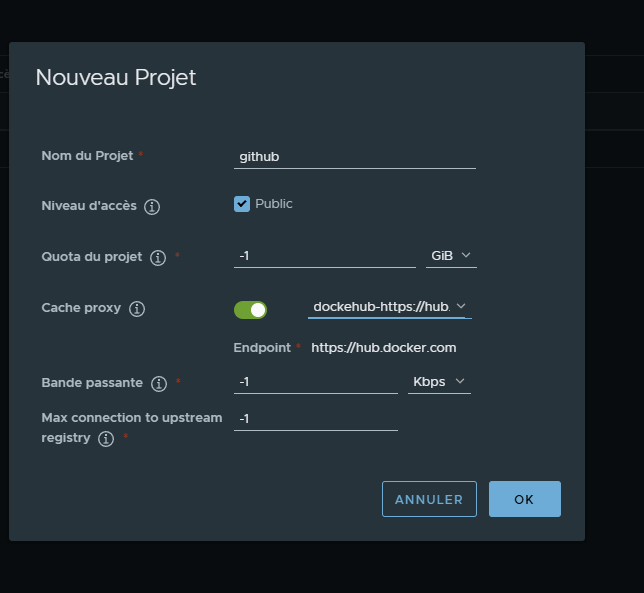
Github est maintenant accessible via Harbor
Il faut juste prefixé le nom de l'image recherchées par l'url du cache Harbor (harbor.bv.stef.lan/github dans l'exemple)
docker pull harbor.bv.stef.lan/github/mariadb:latest
latest: Pulling from github/mariadb
Digest: sha256:e1bcd6f85781f4a875abefb11c4166c1d79e4237c23de597bf0df81fec225b40
Status: Downloaded newer image for harbor.bv.stef.lan/github/mariadb:latest
harbor.bv.stef.lan/github/mariadb:latest
Il n'a pas de vérification sur le pull ( en production ne pas mettre l'acces pubique)
Tag du l'image pour envoie dans le repositor library
docker tag harbor.bv.stef.lan/github/mariadb:latest harbor.bv.stef.lan/library/mariadb:latest
docker push harbor.bv.stef.lan/library/mariadb:latest
¶ Adaptations
¶ Utilisation de du RP Traefik
¶ Modification config.yaml
Le but est d'acceder a Harbor via Traefik.
Ceci evite de devoir binder le port du stack harbor sur une ip accessible du serveur.
Modifier le fichier de config.yml en retirant les toute sections ssl qui devienent inutiles:
Renseigner external_url avec l'url d'acces qui sera définie sur Traefik
hostname: harbor.bv.stef.lan
http:
  port: 80
https:
external_url: https://harbor.bv.stef.lan
harbor_admin_password: xxxxxxxxx
database:
  password: xxxxxx
  max_idle_conns: 100
  max_open_conns: 900
  conn_max_lifetime: 5m
  conn_max_idle_time: 0
data_volume: /data
trivy:
  ignore_unfixed: false
  skip_update: false
  skip_java_db_update: false
  offline_scan: false
  security_check: vuln
  insecure: false
  timeout: 5m0s
jobservice:
  max_job_workers: 10
  max_job_duration_hours: 24
  job_loggers:
    - STD_OUTPUT
    - FILE
  logger_sweeper_duration: 1 #days
notification:
  webhook_job_max_retry: 3
  webhook_job_http_client_timeout: 3 #seconds
log:
  level: info
  local:
    rotate_count: 50
    rotate_size: 200M
    location: /var/log/harbor
_version: 2.14.0
proxy:
  http_proxy:
  https_proxy:
  no_proxy:
  components:
    - core
    - jobservice
    - trivy
upload_purging:
  enabled: true
  age: 168h
  interval: 24h
  dryrun: false
cache:
  enabled: false
  expire_hours: 24
¶ Modifier le fichier docker-compose.yml
- Ajouter les labels destinées à Traefik sur le service proxy
- Le connecter à votre réseau docker associé à traefik.
- Retirer la section port afin de ne plus exposer le service sur l'host.
- Ajouter la définition de votre réseau traefik (external) à la fin du docker-compose.yml
services:

  proxy:
    image: goharbor/nginx-photon:v2.14.1
    container_name: nginx
...
...
    labels:                                                                         <= Labels liés à la configuration Traefik
      - "traefik.enable=true"
      - "traefik.docker.network=traefik"
      - "traefik.http.routers.harbor.rule=Host(`harbor.bv.stef.lan`)"
      - "traefik.http.routers.harbor.tls=true"
      - "traefik.http.services.harbor.loadbalancer.server.port=8080"
    networks:
      - harbor
      - traefik                                                                     <= Ajout connexion au reseau Docker Traefik
...
...
networks:
  harbor:
    external: false
  traefik:																																					<= Ajout de la définition d'acces au réseau Docker Trefik
    external: true
Fichier docker-compose.yml modifié:
services:
  log:
    image: goharbor/harbor-log:v2.14.1
    container_name: harbor-log
    restart: always
    cap_drop:
      - ALL
    cap_add:
      - CHOWN
      - DAC_OVERRIDE
      - SETGID
      - SETUID
    volumes:
      - /var/log/harbor/:/var/log/docker/:z
      - type: bind
        source: ./common/config/log/logrotate.conf
        target: /etc/logrotate.d/logrotate.conf
      - type: bind
        source: ./common/config/log/rsyslog_docker.conf
        target: /etc/rsyslog.d/rsyslog_docker.conf
    ports:
      - 127.0.0.1:1514:10514
    networks:
      - harbor
  registry:
    image: goharbor/registry-photon:v2.14.1
    container_name: registry
    restart: always
    cap_drop:
      - ALL
    cap_add:
      - CHOWN
      - SETGID
      - SETUID
    volumes:
      - /data/registry:/storage:z
      - ./common/config/registry/:/etc/registry/:z
      - type: bind
        source: /data/secret/registry/root.crt
        target: /etc/registry/root.crt
      - type: bind
        source: ./common/config/shared/trust-certificates
        target: /harbor_cust_cert
    networks:
      - harbor
    depends_on:
      - log
    logging:
      driver: "syslog"
      options:
        syslog-address: "tcp://localhost:1514"
        tag: "registry"
  registryctl:
    image: goharbor/harbor-registryctl:v2.14.1
    container_name: registryctl
    env_file:
      - ./common/config/registryctl/env
    restart: always
    cap_drop:
      - ALL
    cap_add:
      - CHOWN
      - SETGID
      - SETUID
    volumes:
      - /data/registry:/storage:z
      - ./common/config/registry/:/etc/registry/:z
      - type: bind
        source: ./common/config/registryctl/config.yml
        target: /etc/registryctl/config.yml
      - type: bind
        source: ./common/config/shared/trust-certificates
        target: /harbor_cust_cert
    networks:
      - harbor
    depends_on:
      - log
    logging:
      driver: "syslog"
      options:
        syslog-address: "tcp://localhost:1514"
        tag: "registryctl"
  postgresql:
    image: goharbor/harbor-db:v2.14.1
    container_name: harbor-db
    restart: always
    cap_drop:
      - ALL
    cap_add:
      - CHOWN
      - DAC_OVERRIDE
      - SETGID
      - SETUID
    volumes:
      - /data/database:/var/lib/postgresql/data:z
    networks:
      harbor:
    env_file:
      - ./common/config/db/env
    depends_on:
      - log
    logging:
      driver: "syslog"
      options:
        syslog-address: "tcp://localhost:1514"
        tag: "postgresql"
    shm_size: '1gb'
  core:
    image: goharbor/harbor-core:v2.14.1
    container_name: harbor-core
    env_file:
      - ./common/config/core/env
    restart: always
    cap_drop:
      - ALL
    cap_add:
      - SETGID
      - SETUID
    volumes:
      - /data/ca_download/:/etc/core/ca/:z
      - /data/:/data/:z
      - ./common/config/core/certificates/:/etc/core/certificates/:z
      - type: bind
        source: ./common/config/core/app.conf
        target: /etc/core/app.conf
      - type: bind
        source: /data/secret/core/private_key.pem
        target: /etc/core/private_key.pem
      - type: bind
        source: /data/secret/keys/secretkey
        target: /etc/core/key
      - type: bind
        source: ./common/config/shared/trust-certificates
        target: /harbor_cust_cert
    networks:
      harbor:
    depends_on:
      - log
      - registry
      - redis
      - postgresql
    logging:
      driver: "syslog"
      options:
        syslog-address: "tcp://localhost:1514"
        tag: "core"
  portal:
    image: goharbor/harbor-portal:v2.14.1
    container_name: harbor-portal
    restart: always
    cap_drop:
      - ALL
    cap_add:
      - CHOWN
      - SETGID
      - SETUID
      - NET_BIND_SERVICE
    volumes:
      - type: bind
        source: ./common/config/portal/nginx.conf
        target: /etc/nginx/nginx.conf
    networks:
      - harbor
    depends_on:
      - log
    logging:
      driver: "syslog"
      options:
        syslog-address: "tcp://localhost:1514"
        tag: "portal"

  jobservice:
    image: goharbor/harbor-jobservice:v2.14.1
    container_name: harbor-jobservice
    env_file:
      - ./common/config/jobservice/env
    restart: always
    cap_drop:
      - ALL
    cap_add:
      - CHOWN
      - SETGID
      - SETUID
    volumes:
      - /data/job_logs:/var/log/jobs:z
      - type: bind
        source: ./common/config/jobservice/config.yml
        target: /etc/jobservice/config.yml
      - type: bind
        source: ./common/config/shared/trust-certificates
        target: /harbor_cust_cert
    networks:
      - harbor
    depends_on:
      - core
    logging:
      driver: "syslog"
      options:
        syslog-address: "tcp://localhost:1514"
        tag: "jobservice"
  redis:
    image: goharbor/redis-photon:v2.14.1
    container_name: redis
    restart: always
    cap_drop:
      - ALL
    cap_add:
      - CHOWN
      - SETGID
      - SETUID
    volumes:
      - /data/redis:/var/lib/redis
    networks:
      harbor:
    depends_on:
      - log
    logging:
      driver: "syslog"
      options:
        syslog-address: "tcp://localhost:1514"
        tag: "redis"
  proxy:
    image: goharbor/nginx-photon:v2.14.1
    container_name: nginx
    restart: always
    cap_drop:
      - ALL
    cap_add:
      - CHOWN
      - SETGID
      - SETUID
      - NET_BIND_SERVICE
    volumes:
      - ./common/config/nginx:/etc/nginx:z
      - type: bind
        source: ./common/config/shared/trust-certificates
        target: /harbor_cust_cert
    networks:
      - harbor
      - traefik
    depends_on:
      - registry
      - core
      - portal
      - log
    logging:
      driver: "syslog"
      options:
        syslog-address: "tcp://localhost:1514"
        tag: "proxy"
    labels:
      - "traefik.enable=true"
      - "traefik.docker.network=traefik"
      - "traefik.http.routers.harbor.rule=Host(`harbor.bv.stef.lan`)"
      - "traefik.http.routers.harbor.tls=true"
      - "traefik.http.routers.harbor.entrypoints=websecure"
      - "traefik.http.services.harbor.loadbalancer.server.port=8080"

  trivy-adapter:
    container_name: trivy-adapter
    image: goharbor/trivy-adapter-photon:v2.14.1
    restart: always
    cap_drop:
      - ALL
    depends_on:
      - log
      - redis
    networks:
      - harbor
    volumes:
      - type: bind
        source: /data/trivy-adapter/trivy
        target: /home/scanner/.cache/trivy
      - type: bind
        source: /data/trivy-adapter/reports
        target: /home/scanner/.cache/reports
      - type: bind
        source: ./common/config/shared/trust-certificates
        target: /harbor_cust_cert
    logging:
      driver: "syslog"
      options:
        syslog-address: "tcp://localhost:1514"
        tag: "trivy-adapter"
    env_file:
      ./common/config/trivy-adapter/env
networks:
  harbor:
    external: false
  traefik:
    external: true
Relancer le docker compose
¶ Vérification Traefik
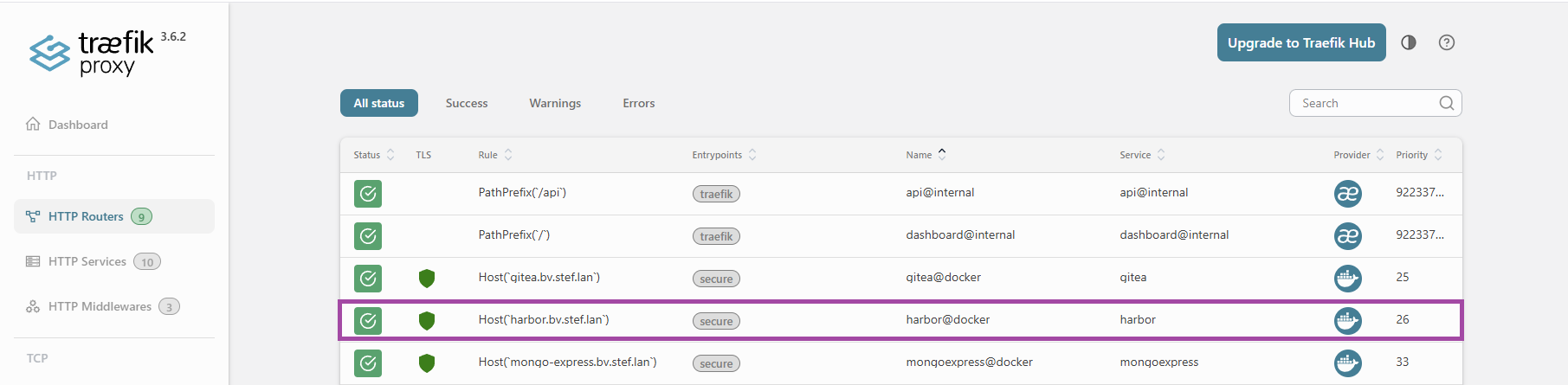
Maintenant l'accès passe par le reverse proxy les certificats internes harbor ne sont plus nécessaires la TLS étant gérée par le RP.
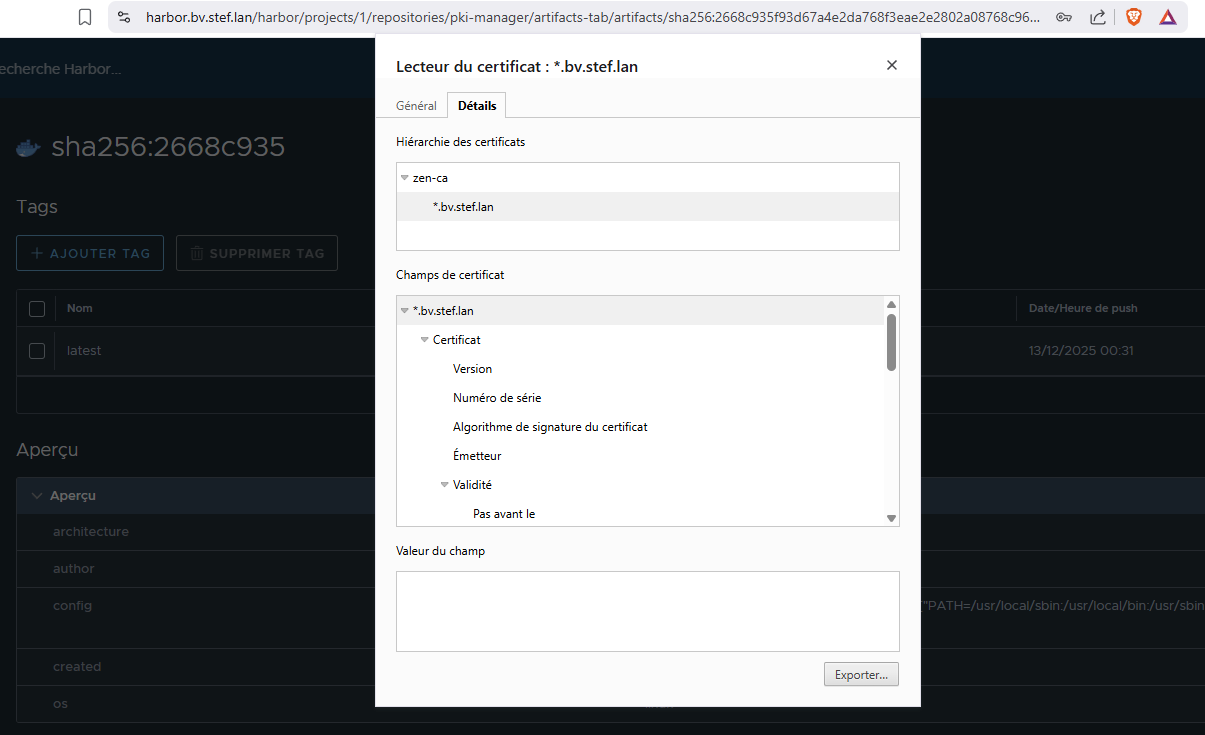
Il n'y a plus de ports liés au stack Harbor exposés sur l'interface publique du serveur.
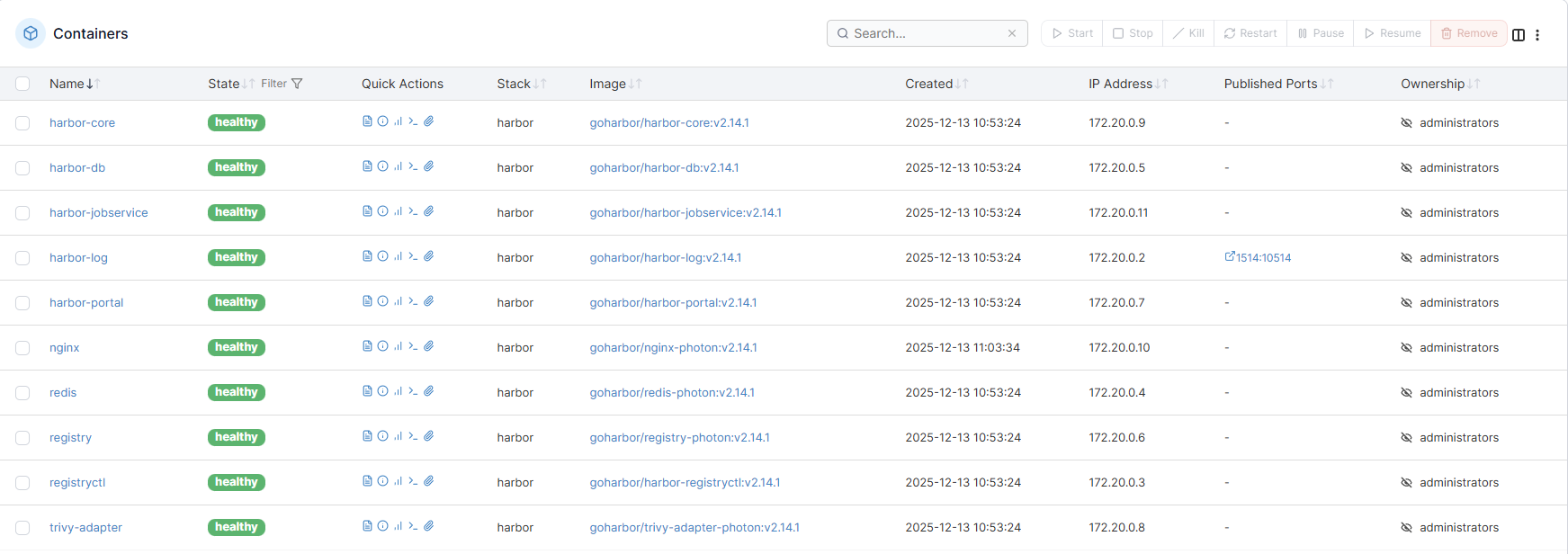
Il reste le service harbor-log mais il bind sur localhost:
stef@infra:~/docker/harbor$ docker compose ps
NAME                IMAGE                                   COMMAND                  SERVICE         CREATED          STATUS                    PORTS
harbor-core         goharbor/harbor-core:v2.14.1            "/harbor/entrypoint.…"   core            26 minutes ago   Up 13 minutes (healthy)
harbor-db           goharbor/harbor-db:v2.14.1              "/docker-entrypoint.…"   postgresql      26 minutes ago   Up 13 minutes (healthy)
harbor-jobservice   goharbor/harbor-jobservice:v2.14.1      "/harbor/entrypoint.…"   jobservice      26 minutes ago   Up 13 minutes (healthy)
harbor-log          goharbor/harbor-log:v2.14.1             "/bin/sh -c /usr/loc…"   log             26 minutes ago   Up 13 minutes (healthy)   127.0.0.1:1514->10514/tcp
harbor-portal       goharbor/harbor-portal:v2.14.1          "nginx -g 'daemon of…"   portal          26 minutes ago   Up 13 minutes (healthy)
nginx               goharbor/nginx-photon:v2.14.1           "nginx -g 'daemon of…"   proxy           16 minutes ago   Up 13 minutes (healthy)
redis               goharbor/redis-photon:v2.14.1           "redis-server /etc/r…"   redis           26 minutes ago   Up 13 minutes (healthy)
registry            goharbor/registry-photon:v2.14.1        "/home/harbor/entryp…"   registry        26 minutes ago   Up 13 minutes (healthy)
registryctl         goharbor/harbor-registryctl:v2.14.1     "/home/harbor/start.…"   registryctl     26 minutes ago   Up 13 minutes (healthy)
trivy-adapter       goharbor/trivy-adapter-photon:v2.14.1   "/home/scanner/entry…"   trivy-adapter   26 minutes ago   Up 13 minutes (healthy)
¶ Déplacement des data
L'installation de base génère des données dans une repertoire systeme ( /data par defaut).
Contenu de /data:
stef@infra:~/docker/harbor$ ls /data/
ca_download  database  job_logs  redis  registry  secret  trivy-adapter
De plus ceci oblige à utiliser root
Nous allons déplacer les données sur un volume Docker
¶ Création su volume Docker
docker compose down
docker volume create harbor_data
¶ Déplacement des données:
sudo su -
mv /data/* /app/docker/volumes/harbor_data/_data/
¶ Modifier le docker-compose pour prendre en compte la nouvelle localisation des datas
Nous devons utiliser la syntaxe de définition des volumes permettant monter un sous répertoire:
   volumes:
     - type: volume
       source: NOM_DU_VOLUME_DOCKER
       target: PATH_DU_MONTAGE_SUR_LE_CONTAINER
       volume:
         subpath: PATH_RELATIF_DANS_LE_SOUS_REPERTOIRE_DU_VOLUME
Exemple pour monté le sous-repertoire registry du volume harbor_data dans /storage du container:
    volumes:
      - type: volume
        source: harbor_data
        target: /storage
        volume:
          subpath: registry
Fichier docker-compose.yml modifié
services:
  log:
    image: goharbor/harbor-log:v2.14.1
    container_name: harbor-log
    restart: always
    cap_drop:
      - ALL
    cap_add:
      - CHOWN
      - DAC_OVERRIDE
      - SETGID
      - SETUID
    volumes:
      - /var/log/harbor/:/var/log/docker/:z
      - type: bind
        source: ./common/config/log/logrotate.conf
        target: /etc/logrotate.d/logrotate.conf
      - type: bind
        source: ./common/config/log/rsyslog_docker.conf
        target: /etc/rsyslog.d/rsyslog_docker.conf
    ports:
      - 127.0.0.1:1514:10514
    networks:
      - harbor
  registry:
    image: goharbor/registry-photon:v2.14.1
    container_name: registry
    restart: always
    cap_drop:
      - ALL
    cap_add:
      - CHOWN
      - SETGID
      - SETUID
    volumes:
      - type: volume
        source: harbor_data
        target: /storage
        volume:
          subpath: registry
      - ./common/config/registry/:/etc/registry/:z
      - type: volume
        source: harbor_data
        target: /etc/registry/root.crt
        volume:
          subpath: secret/registry/root.crt
      - type: bind
        source: ./common/config/shared/trust-certificates
        target: /harbor_cust_cert
    networks:
      - harbor
    depends_on:
      - log
    logging:
      driver: "syslog"
      options:
        syslog-address: "tcp://localhost:1514"
        tag: "registry"
  registryctl:
    image: goharbor/harbor-registryctl:v2.14.1
    container_name: registryctl
    env_file:
      - ./common/config/registryctl/env
    restart: always
    cap_drop:
      - ALL
    cap_add:
      - CHOWN
      - SETGID
      - SETUID
    volumes:
      - type: volume
        source: harbor_data
        target: /storage
        volume:
          subpath: registry
      - ./common/config/registry/:/etc/registry/:z
      - type: bind
        source: ./common/config/registryctl/config.yml
        target: /etc/registryctl/config.yml
      - type: bind
        source: ./common/config/shared/trust-certificates
        target: /harbor_cust_cert
    networks:
      - harbor
    depends_on:
      - log
    logging:
      driver: "syslog"
      options:
        syslog-address: "tcp://localhost:1514"
        tag: "registryctl"
  postgresql:
    image: goharbor/harbor-db:v2.14.1
    container_name: harbor-db
    restart: always
    cap_drop:
      - ALL
    cap_add:
      - CHOWN
      - DAC_OVERRIDE
      - SETGID
      - SETUID
    volumes:
      - type: volume
        source: harbor_data
        target: /var/lib/postgresql/data
        volume:
          subpath: database
    networks:
      harbor:
    env_file:
      - ./common/config/db/env
    depends_on:
      - log
    logging:
      driver: "syslog"
      options:
        syslog-address: "tcp://localhost:1514"
        tag: "postgresql"
    shm_size: '1gb'
  core:
    image: goharbor/harbor-core:v2.14.1
    container_name: harbor-core
    env_file:
      - ./common/config/core/env
    restart: always
    cap_drop:
      - ALL
    cap_add:
      - SETGID
      - SETUID
    volumes:
      - type: volume
        source: harbor_data
        target: /etc/core/ca
        volume:
          subpath: ca_download
      - harbor_data:/data
      - ./common/config/core/certificates/:/etc/core/certificates/:z
      - type: bind
        source: ./common/config/core/app.conf
        target: /etc/core/app.conf
      - type: volume
        source: harbor_data
        target: /etc/core/private_key.pem
        volume:
          subpath: secret/core/private_key.pem
      - type: volume
        source: harbor_data
        target: /etc/core/key
        volume:
          subpath: secret/keys/secretkey
      - type: bind
        source: ./common/config/shared/trust-certificates
        target: /harbor_cust_cert
    networks:
      harbor:
    depends_on:
      - log
      - registry
      - redis
      - postgresql
    logging:
      driver: "syslog"
      options:
        syslog-address: "tcp://localhost:1514"
        tag: "core"
  portal:
    image: goharbor/harbor-portal:v2.14.1
    container_name: harbor-portal
    restart: always
    cap_drop:
      - ALL
    cap_add:
      - CHOWN
      - SETGID
      - SETUID
      - NET_BIND_SERVICE
    volumes:
      - type: bind
        source: ./common/config/portal/nginx.conf
        target: /etc/nginx/nginx.conf
    networks:
      - harbor
    depends_on:
      - log
    logging:
      driver: "syslog"
      options:
        syslog-address: "tcp://localhost:1514"
        tag: "portal"

  jobservice:
    image: goharbor/harbor-jobservice:v2.14.1
    container_name: harbor-jobservice
    env_file:
      - ./common/config/jobservice/env
    restart: always
    cap_drop:
      - ALL
    cap_add:
      - CHOWN
      - SETGID
      - SETUID
    volumes:
      - type: volume
        source: harbor_data
        target: /var/log/jobs
        volume:
          subpath: job_logs

      - type: bind
        source: ./common/config/jobservice/config.yml
        target: /etc/jobservice/config.yml
      - type: bind
        source: ./common/config/shared/trust-certificates
        target: /harbor_cust_cert
    networks:
      - harbor
    depends_on:
      - core
    logging:
      driver: "syslog"
      options:
        syslog-address: "tcp://localhost:1514"
        tag: "jobservice"
  redis:
    image: goharbor/redis-photon:v2.14.1
    container_name: redis
    restart: always
    cap_drop:
      - ALL
    cap_add:
      - CHOWN
      - SETGID
      - SETUID
    volumes:
      - type: volume
        source: harbor_data
        target: /var/lib/redis
        volume:
          subpath: redis
    networks:
      harbor:
    depends_on:
      - log
    logging:
      driver: "syslog"
      options:
        syslog-address: "tcp://localhost:1514"
        tag: "redis"
  proxy:
    image: goharbor/nginx-photon:v2.14.1
    container_name: nginx
    restart: always
    cap_drop:
      - ALL
    cap_add:
      - CHOWN
      - SETGID
      - SETUID
      - NET_BIND_SERVICE
    volumes:
      - ./common/config/nginx:/etc/nginx:z
      - type: bind
        source: ./common/config/shared/trust-certificates
        target: /harbor_cust_cert
    networks:
      - harbor
      - traefik
    depends_on:
      - registry
      - core
      - portal
      - log
    logging:
      driver: "syslog"
      options:
        syslog-address: "tcp://localhost:1514"
        tag: "proxy"
    labels:
      - "traefik.enable=true"
      - "traefik.docker.network=traefik"
      - "traefik.http.routers.harbor.rule=Host(`harbor.bv.stef.lan`)"
      - "traefik.http.routers.harbor.tls=true"
      - "traefik.http.routers.harbor.entrypoints=secure"
      - "traefik.http.services.harbor.loadbalancer.server.port=8080"

  trivy-adapter:
    container_name: trivy-adapter
    image: goharbor/trivy-adapter-photon:v2.14.1
    restart: always
    cap_drop:
      - ALL
    depends_on:
      - log
      - redis
    networks:
      - harbor
    volumes:
      - type: volume
        source: harbor_data
        target: /home/scanner/.cache/trivy
        volume:
          subpath: trivy-adapter/trivy
      - type: volume
        source: harbor_data
        target: /home/scanner/.cache/reports
        volume:
          subpath: trivy-adapter/reports
      - type: bind
        source: ./common/config/shared/trust-certificates
        target: /harbor_cust_cert
    logging:
      driver: "syslog"
      options:
        syslog-address: "tcp://localhost:1514"
        tag: "trivy-adapter"
    env_file:
      ./common/config/trivy-adapter/env
networks:
  harbor:
    external: false
  traefik:
    external: true

volumes:
  harbor_data:
    external: true
Il faut égalemnt modifier les droits des fichiers suivants:
Le path de mon container est /home/stef/docker/harbor, adapter en fonction de votre implementation
sudo chmod a+r /home/stef/docker/harbor/common/config/jobservice/env
sudo chmod a+r /home/stef/docker/harbor/common/config/trivy-adapter/env
sudo chmod a+r /home/stef/docker/harbor/common/config/db/env
sudo chmod a+r /home/stef/docker/harbor/common/config/core/env
sudo chmod a+r /home/stef/docker/harbor/common/config/registryctl/env
¶ Vérifications
Maintenant mon utilisateur peut lancer le container.
Il n'a y plus de fichiers ou répèrtoire nécéssitant l'utilisation de root.
stef@infra:~/docker/harbor$ docker compose up -d
[+] Running 10/10
 ✔ Container harbor-log         Started                                                                                                                                                                                0.2s
 ✔ Container redis              Started                                                                                                                                                                                0.4s
 ✔ Container registry           Started                                                                                                                                                                                0.5s
 ✔ Container registryctl        Started                                                                                                                                                                                0.4s
 ✔ Container harbor-db          Started                                                                                                                                                                                0.5s
 ✔ Container harbor-portal      Started                                                                                                                                                                                0.5s
 ✔ Container trivy-adapter      Started                                                                                                                                                                                0.3s
 ✔ Container harbor-core        Started                                                                                                                                                                                0.3s
 ✔ Container nginx              Started                                                                                                                                                                                0.4s
 ✔ Container harbor-jobservice  Started